The campaign looked exceptionally engaging. Some recipients had clicked every link. They had even reached the preferences page.
Then we looked at the clock.
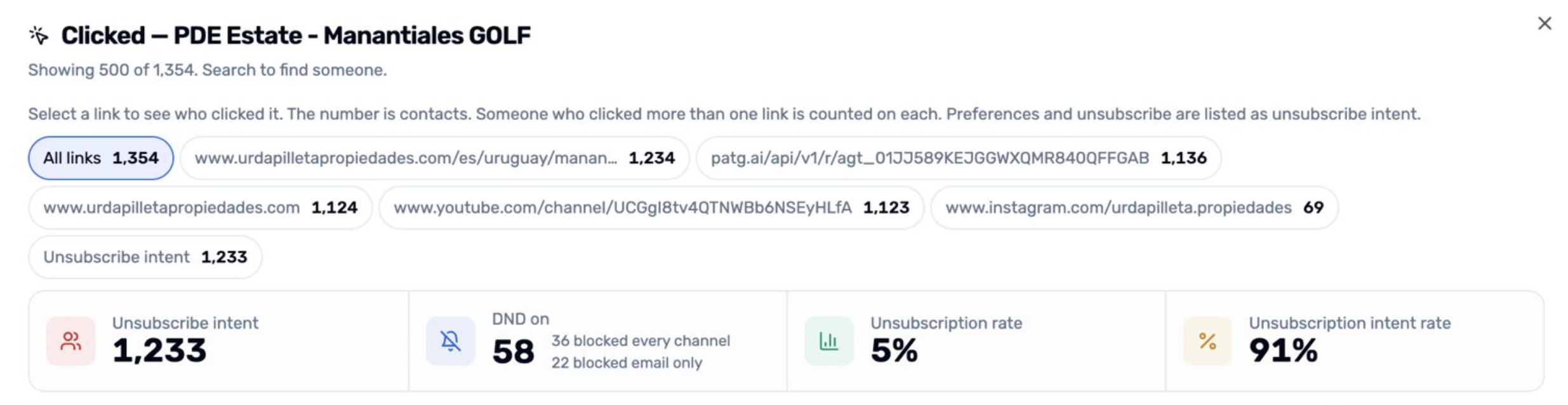
In one real newsletter send, 1020 contacts clicked nearly every link within 10 seconds, and for 1004 of them, do-not-disturb is off. They are left out of unsubscribe intent. 16 clicked nearly every link just as fast, and do-not-disturb is on, so they stay in unsubscribe intent.
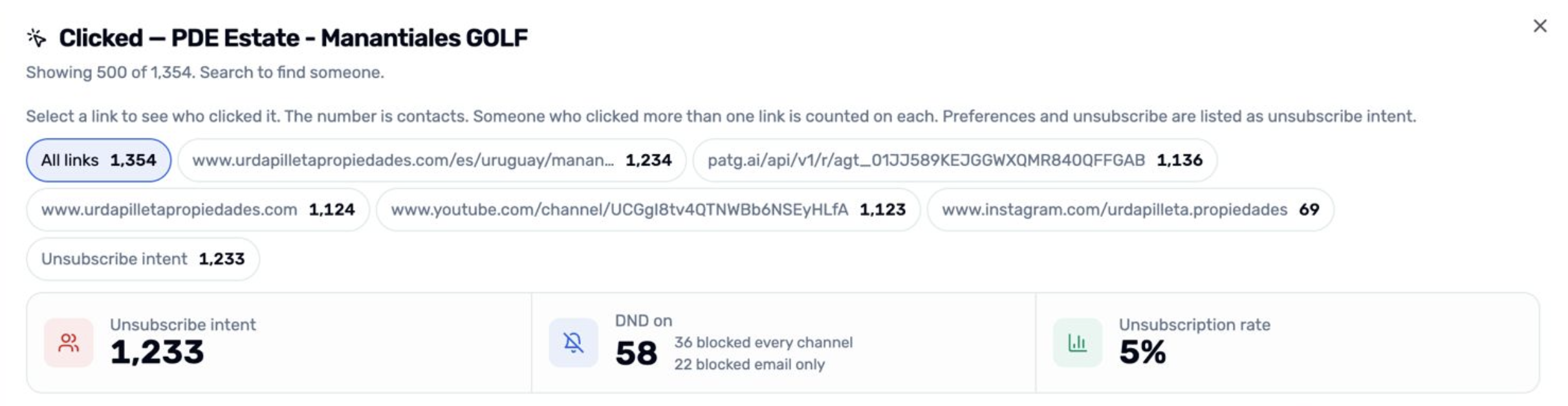
That was not one simple audience behavior. It was two different signals hiding behind the same event name: click.
The pattern led us to build Correction in growthOS Email Statistics—a review process that separates likely security scans from human engagement while keeping the original event history intact.
The click is no longer a simple signal
Email security systems may inspect links before a message reaches the reader. That is useful protection, but the resulting requests can enter an analytics stream as ordinary clicks.
The dashboard cannot infer intent from the word clicked. It needs context.
Did one person choose one relevant link after reading the email? Or did software request nearly every destination in a burst, including the preferences link, before a human had time to scan the first paragraph?
When both become the same metric, three numbers can drift:
The number of people who clicked
The clicked-to-opened rate
The number of people who appear to have shown unsubscribe intent
More data does not automatically create better insight. Sometimes it creates a more confident version of the wrong story.
The pattern we found
We did not begin with a generic “bot filter.” We began with the event timeline of a specific send.
The newsletter contained six distinct tracked links. 1020 recipients appeared to click all six within 10 seconds. The timing and coverage formed a pattern that ordinary reading behavior did not explain well.
The do-not-disturb state added a second piece of evidence:
1004 recipients had not enabled email do-not-disturb. Their rapid preference clicks should not be treated as confirmed unsubscribe intent.
16 recipients had enabled it. Their unsubscribe intent had to remain, even though their click pattern looked automated.
This is why Correction does more than subtract a number from a total. It separates engagement classification from consent state.
The Correction formula you need
Correction analyzes each recipient within one email send.
A recipient is classified as a likely scanner when:
The email contains at least two distinct tracked links.
The recipient clicks the required set within 10 seconds, measured from first click to last.
With two links, both must be clicked. With three or more, the recipient must click every link or every link except one.
The “except one” rule came from the observed shape of scanner activity: a scan may cover nearly the whole email while leaving one destination—often a social link—untouched.
The guardrails matter:
One tracked link is never enough to classify a recipient as a scanner.
Recipient-specific preference tokens are normalized before links are compared.
Correction does not run when the event history available for the send is incomplete.
This is a behavioral heuristic, not a claim of perfect bot detection. Its value comes from being specific, visible, and conservative enough to explain.
When device distribution becomes a warning sign
The chart below was one of the first indications that something was wrong. Out of 1,239 recipients recorded as having clicked, 1,141 (92%) were attributed to desktop devices, while only 98 (8%) were attributed to mobile.
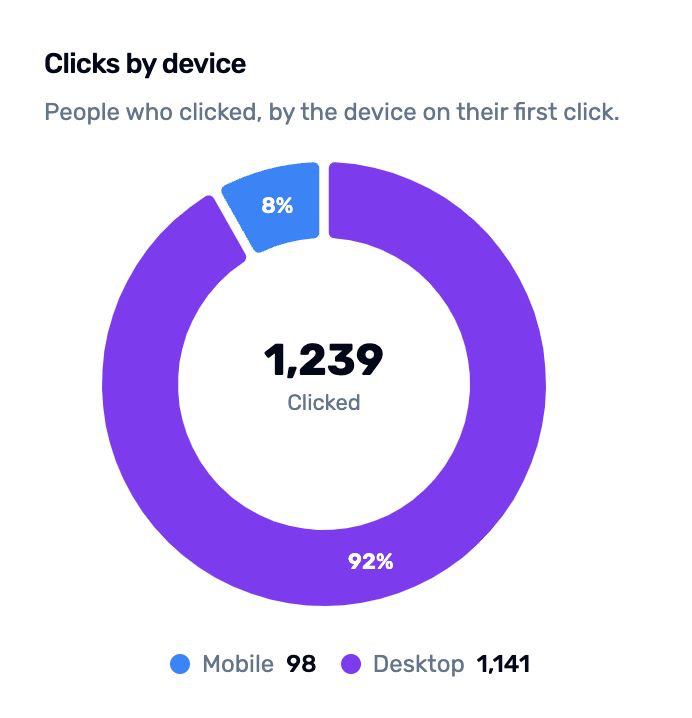
For a typical newsletter audience, such an extreme imbalance deserves investigation. It suggests that some of the recorded clicks may not represent actual human engagement but automated activity from corporate email security systems, which often scan links from desktop or server environments.
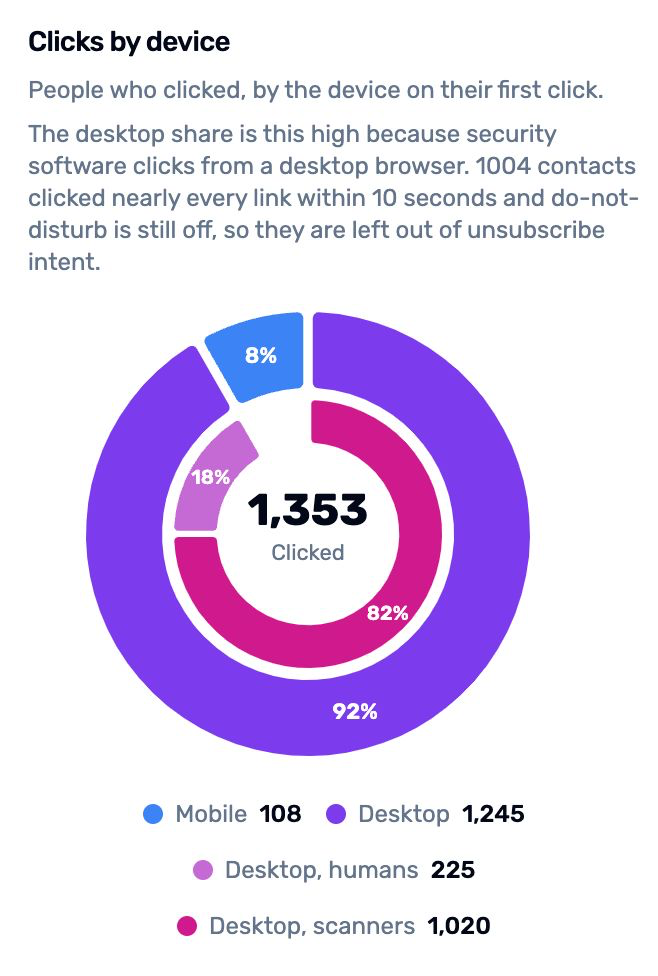
The 92% desktop share does not prove bot activity on its own, but it is a strong warning signal. Combined with recipients clicking nearly every link within seconds, it provides a compelling reason to question the accuracy of the reported click rate.
We preserve the evidence
It would be easy to delete suspicious clicks. We chose not to and you shouldn't either. it's an evidence. keep it in a non-impactable place.
When a user selects Run correction, growthOS keeps the click events and marks the identified scanner events so they no longer contribute to Email Statistics. It also records that the send has been corrected.
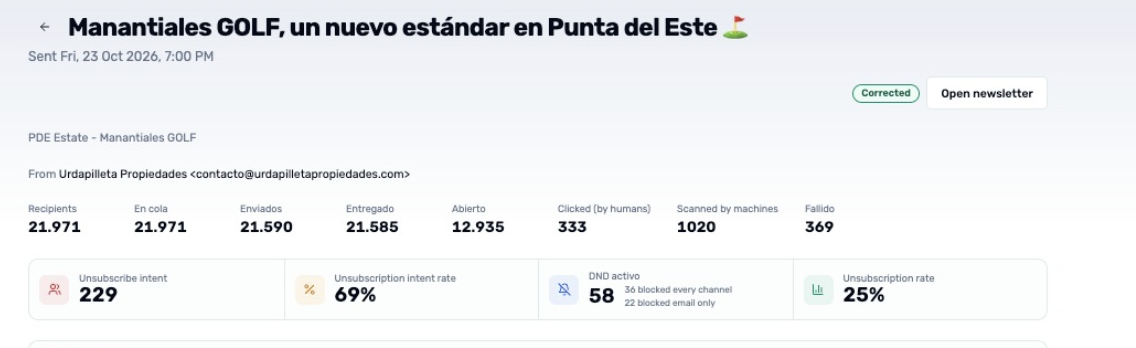
That design creates three advantages:
Auditability: the original activity remains in the event history.
Consistency: reopening the campaign uses the saved decision instead of rerunning the formula against a moving dataset.
Clarity: the interface can show Clicked (by humans) beside Scanned by machines, rather than silently changing a total.
Once reviewed, the campaign displays a Corrected badge.
A click rate people can actually discuss
After Correction, the clicked-to-opened rate uses:
Human clickers ÷ opened recipients × 100
The dashboard also separates scanner activity in the device view. That is important because automated checks can make desktop traffic look disproportionately strong.
The result is not just a cleaner chart. It is a better conversation.
Marketers can discuss content that attracted human attention. Sales teams can avoid reading machine activity as buying intent. Agencies can explain campaign performance without presenting a security scan as a prospect’s decision.
Consent gets the final word
The most sensitive case is the preferences or unsubscribe link.
Correction uses the contact’s email do-not-disturb status as a safeguard:
If do-not-disturb is off, a scanner’s preferences click is excluded from unsubscribe intent.
If do-not-disturb is on, the intent remains.
If growthOS cannot match the recipient safely to a contact, the intent remains.
The system removes likely machine noise, but it does not use that classification to reverse a confirmed opt-out.
What this changes for email teams
Correction turns click analytics from a passive counter into a reviewable measurement process.
You can now:
See likely human clickers and machine scans separately
Correct one send without deleting its event trail
Protect real unsubscribe intent
Keep corrected campaigns stable when they are opened again
Explain the rule behind the number
That last point matters. Trust in analytics does not come from a mysterious “cleaned” metric. It comes from knowing what was counted, what was excluded, and why.
From inflated activity to usable insight
Security scanners are doing their job. Email analytics has to do a different one.
The goal of Correction is not to make campaign performance look better. It is to make the reported signal more meaningful. In the campaign that revealed the issue, the difference was visible: 1020 rapid all-link clickers, 1004 false unsubscribe-intent candidates removed, and 16 confirmed opt-outs preserved.
That is the kind of correction worth making—not because it changes the chart, but because it changes what the chart can honestly tell you.
Key takeaways
Security checks can enter email analytics as ordinary clicks.
The observed case contained 1020 recipients who clicked all six links within 10 seconds.
Correction uses a transparent, send-level behavioral rule and never classifies a single-link click as a scanner.
Original events remain stored; corrected scanner events simply stop contributing to engagement statistics.
Confirmed do-not-disturb status always protects genuine unsubscribe intent.
Frequently asked questions
Should Correction delete email events?
No. It preserves the events and marks identified scanner clicks so they no longer count in Email Statistics.
Does Correction run every time somebody opens the report?
No. It runs when an authorized user selects Run correction for an unreviewed send. The saved result is reused afterward.
Can a single fast click be classified as a scanner?
No. The email must contain at least two distinct tracked links, and a two-link email requires both links to be clicked within the 10-second window.
What happens to an unsubscribe click from a likely scanner?
The contact’s email do-not-disturb state decides whether unsubscribe intent remains. Confirmed opt-outs and recipients that cannot be matched safely are preserved.
Is Correction perfect bot detection?
No. It is an explainable behavioral heuristic designed around a verified click-burst pattern. It improves the signal for that pattern without claiming to detect every automated system.
Fact basis
growthOS implementation
Correction persistence
Send-level display and rate formula